Visual Tracker helps QA teams, web agencies, and client-service teams capture issues with screenshots and recordings, triage them with AI, and keep work moving across active boards.
Three reasons teams choose a screenshot-first workflow instead of email threads, Slack screenshots, and generic tickets.
Start from a screenshot, recording, voice note, or embedded widget instead of making reporters write perfect bug tickets.
Annotations, AI-structured issue details, and richer visual context mean fewer clarifying messages before work can start.
Keep each board focused while giving leads and agencies a way to review work across multiple active projects.
Visual Tracker is strongest when the team can understand the system in one glance: capture, triage, automate, and keep noisy follow-up under control.
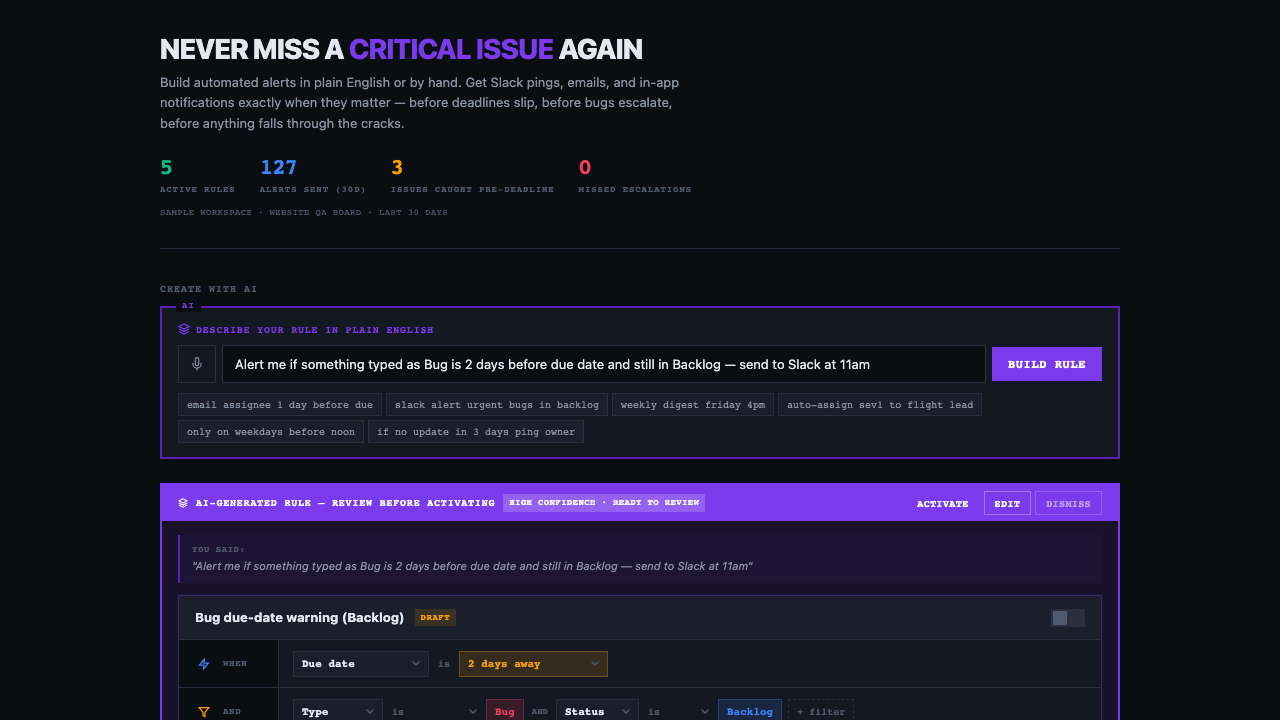
Teams can see what a rule would hit, who would get notified, and how spam is prevented before they ever turn it on.
Visual Tracker shows the handoff after capture: ownership, alerts, and follow-through all stay visible in the same workflow.
Reporters capture context once. The team gets structured issue detail instead of follow-up churn.
Impact preview and guardrails make alerts feel like a controlled system, not a spam risk.
The widget lowers friction for clients and testers without sacrificing the workflow behind the scenes.
Leads can monitor active projects without flattening every team into one noisy backlog.
Mark up the screenshot, point to the broken spot, and hand off a clean issue with status, priority, and owner already set.
Clients and testers report issues right where they happen. Screenshot, description, and context flow straight into your board.
Leads and agency managers review work across multiple boards without flattening teams into one noisy backlog. Split or aggregate views, issue counts, and risk signals in one glance.
Screenshots, markup, and AI issue structure make the fix path obvious without another round of explanation.
Clients and testers get a lightweight capture flow while your team still works from a real board, not an inbox.
From QA bug or client note to resolved issue in three steps
Screenshot the bug, record your screen, or use voice notes. The feedback widget lets anyone on your team report issues in seconds with full context.
AI structures rough reports into usable issues, flags duplicates, and suggests priority so PMs, QA, and engineering stay on the same page.
Track fixes on the board, keep clients and internal reviewers aligned, and use Control Tower when multiple projects need one view.
Visual Tracker starts with web and QA teams, but works anywhere visual issues need tracking — agencies, client-service teams, and real estate transactions.
Replace vague bug reports with screenshots, recordings, AI triage, and a board your team can trust.
Give each client a clean feedback workflow, then use Control Tower to manage multiple boards without losing context.
Keep implementation, support, and delivery teams aligned on visual issues without forcing everyone into a heavyweight process.
Track inspection punch lists, repair coordination, and walkthrough items with photo evidence and clear ownership per transaction.
Visual Tracker works best when the issue starts with a screenshot, a client comment, or a review round that needs clearer execution than email and chat can provide.
The strongest fit is teams that want one visible path from report to action. The weak fit is teams that mainly want a giant internal engineering admin suite.
Visual Tracker wins when screenshots, review rounds, and client feedback need to turn into clean execution instead of another message thread.
For teams where fuzzy bug reports slow engineering down.
For teams managing client reviews and internal delivery in parallel.
For leads who need visibility across active boards without flattening everything.
That usually looks like repeated follow-up, client review churn, and too many issues living in chat or email instead of a visible workflow.
Visual Tracker is not trying to be the most customizable engineering operations suite for large internal software orgs.
Built for teams that capture visual issues, route client feedback, and keep active boards moving
Ask your board what matters now. Summarize the sprint, review blockers, check what is overdue, or get a cross-board pulse when client work starts piling up.
One-click screenshots with automatic context — browser, viewport, URL, and console errors captured automatically.
Record screen interactions to show exactly how to reproduce the bug. Video captures with WebM encoding.
AI structures freeform bug reports into actionable issues. Duplicate detection prevents wasted effort. Solution suggestions speed resolution.
Draw arrows, add text, highlight regions, drop emoji markers. Show your team exactly where the problem is.
Attach voice recordings to any issue. Explain complex bugs verbally when screenshots aren't enough.
Embed a lightweight widget on any site. Users and testers can report bugs without leaving your app.
Visual Tracker is easiest to understand when teams can see the review loops, escalation rules, and cross-board operating model they need to run.
Show buyers how leads get an instant board brief, blocker summary, and client-safe recap without manually scanning every issue.
Turn overdue issues, stale feedback, and client-facing escalations into visible rules with AI-assisted setup and built-in safety guardrails.
Show stakeholders the actual rule builder with simulation, recipient preview, next run timing, and no-spam protections.
Use a launch-ready checklist when the final review round needs cleaner bug evidence, clearer owners, and faster blocker escalation.
Give QA leads, PMs, and agencies repeatable workflows for client reviews, UAT cycles, and follow-through after feedback arrives.
See where a screenshot-first workflow beats general issue systems and where a lighter feedback widget is not enough.
Best for teams deciding between a broad engineering system and a tool built around better issue capture.
Best for product teams comparing elegant issue execution with visual bug reporting and review workflows.
Best for agencies that need more than embedded capture and want a real board workflow after feedback arrives.
Best for agencies comparing a familiar client feedback layer with a fuller AI-assisted workflow after capture.
Start free. Upgrade when your team grows.
Need more AI? Add 25 assists anytime for $5 — no subscription change required.
Use Visual Tracker to capture bugs visually, reduce review churn, and keep QA and client work moving in one place.
Start Free — No Credit Card →Questions, feedback, or partnership inquiries — we'd love to hear from you.